


















Frequently Asked Questions
If you couldn't find your answer here, feel free to contact AI CHATBOT
GENERAL 7 Questions
- If you still haven't received the verification code on your phone, try again by refreshing the page.
- If you are sure that your phone is connected to a network and there is no connection problem, you can send an email to support@gamermarkt.com to resolve the issue.
- A third party service accepted by many companies in the world is used to verify identity.
- If you are facing any problem, you can create ticket on support page to resolve the issue.
- For CS2 Item/Skin: 5% fee.
- Other listings: 15% fee.
- When setting a price, sellers enter the amount they want to receive from the sale. The system adds the sales commission to this amount to calculate the listing price. Buyers pay no more than the price shown.
- Yes. You can use the Notification Preferences page to manage the channels from which you want to receive GamerMarkt notifications.
Paid promotion helps your listing reach more buyers. Visit Promote Listing to see the available packages and purchase a promotion.
Some advantages it will provide you;
- It boosts your listing to reach more users.
- This boosting means making sure your listing appears at the top.
- GamerMarkt's special algorithm is used for this boosting process.
- Your listing will be shown on top, especially to people who may be interested in your listing, and your sales speed will increase.
- You need to send the message "I want to know the e-mail address of my membership to which I have verified my number." on the corporate WhatsApp line (+90 850 303 59 13) of our site.
- If you do not receive a response within 24 hours after sending a message, you can send an email to support@gamermarkt.com to resolve the issue.
- You can get support quickly on the Create Support Request page for account closure and account deletion.
Balance Top-Ups and Withdrawals 10 Questions
- Use the Top Up Balance page to add funds to your GamerMarkt balance.
- GamerMarkt does not charge an additional commission for balance top-ups.
- If the payment provider charges a fee, the balance top-up page shows you the amount.
- No, GamerMarkt does not make any deductions when withdrawing the balance.
- In case of any deduction by the payment service provider or the bank, the balance withdrawal page shows you how much deduction will be made.
- Balance top-ups are processed by payment providers.
- Credit card/debit card payments are processed instantly into the system.
- Bank payments (SWIFT etc.) will be transferred to your account after the payment service provider checks after the payment notification.
- If you have any problems, you can create ticket on support page.
Adding a bank account lets you choose where to send your money when you withdraw your GamerMarkt balance.
- Open the Add Bank Account page.
- In this page, fill in the required Information and IBAN Information sections correctly.
- The bank account holder must be 18 or older.
- Please note that you can only add a bank account in your own name.
- Make sure that the IBAN and account holder information appear on the account statement you uploaded.
- Make sure that the bank account is within the borders of the EEA (European Economic Area) and the account currency is EURO.
- Note: All the information you enter is part of the secure shopping system we are trying to create for buyers and sellers.
- Note: All your data will be recorded in a secure (encrypted) format.
- Before withdrawing your balance, add a bank account on the Add Bank Account page.
- Enter the Withdraw Balance page.
- Carefully read the information text on the opened page.
- Enter the amount you want to withdraw from your balance and click the "Withdraw Balance" button.
- Your transaction has been sent to approval of a specialist. If there is no problem in your transactions, your payment will be transferred to the bank account you have chosen within the specified time.
- Since the payments are sent via Bank Transfer (SWIFT etc.), money transfer cannot be made on the days when the banks are on holiday.
- Bank holidays: Public holidays, eids, weekends, etc.
- To request a refund of a balance top-up, create a support request and ask for the top-up amount to be returned to your card.
- On the Create Support Request page, select "Balance Top-Up" instead of "Balance Withdrawal". Our specialists will help you within 24 hours.
If there is no incorrect or incomplete information in the bank account information you have defined after creating your balance withdrawal request, your payment will be transferred to the bank account you have chosen between 13:00 and 17:00 (GMT +3) on the date shown on the withdrawal page when you create the request. When the transfer is done, you will be informed about your site membership and your registered e-mail address on our site. (Except public holidays)
In accordance with the instructions given above, if your relevant balance is still not credited to your account;
- The IBAN you provided may be incorrect.
- The bank account holder name may be incorrect.
- The bank account may be closed/restricted.
- The bank account may be deposit/savings account.
If such a situation has occurred, the money is usually refunded to us. In this case, you can contact us at Create Support Request .
BUYING ACCOUNTS 9 Questions
- Enter the listing (account) details you want to buy.
- In order to buy the listing and make a payment, please click the "Buy Now" button, carefully read the warnings on the page that opens and fill in the required fields.
- After your payment, all checks and transfers are carried out by us.
- After our delivery specialists complete your order, open "My Account" -> "My Orders" and click the "See Account Details" button next to the order to access your account information. The information is in the "Account Details" section of the order details.
- First of all, it is important that the price of the account you will buy is not too cheap compared to the market price. In some cases, sellers may find the price low and stop selling their accounts after the account has been sold.
- When you examine the Seller Profile of the person selling the account, you can determine whether the seller is reliable or not when you examine the information such as the first sale, total sales, problems experienced and seller badge.
- You should make sure that the account you purchased matches the criteria you are looking for. Thanks to the filters you will use when purchasing an account, you can filter accounts with all the qualifications you want.
- Please note that GamerMarkt gives full support to buyers in case of seller-related problems.
- Account information is checked by the delivery specialists during the transfer process. If you have any problems, you can create ticket on support page.
- Certainly. During the delivery of Riot Games accounts, the e-mail address linked to the account is replaced with the address you gave when paying. Riot sends a confirmation e-mail to that address; click the link in it to confirm the transfer.
- If Riot's e-mail does not arrive or the transfer cannot be completed this way, the account is linked to a mailbox opened by our site, and that mailbox's address and password are given to you in your order details.
- If you wish, you can change the account's e-mail address again after delivery is complete.
- To change the email address of other game accounts, open "My Account" -> "My Orders", open the order page with the order's "Track Delivery" button and complete the transfer by communicating with the seller in the "Account Transfer/Chat" tab.
- You can contact the seller by clicking on the bubble to the right of the seller's name in the listing details you want to buy.
- Due to the fact that the paid accounts are delivered to the delivery specialists by the sellers, they are usually delivered within 2-3 hours.
- After the payment is made, the seller has 24 hours to complete the transactions.
- If the seller does not deliver the account within this period, the transaction can be canceled at the request of the buyer.
- In case of cancellation of the transaction, the payment made to the listing is returned to the buyer and the cancellation counts as an issue on the seller's profile.
- After our delivery specialists complete your order, open "My Account" -> "My Orders" and click the "See Account Details" button next to the order to access your account information. The information is in the "Account Details" section of the order details.
- Apart from Riot Games and Steam, accounts with any bans or restrictions are not allowed to be sold on our site.
- For Riot Games accounts (LoL, TFT, Valorant), an account with an active ban on the Riot account or in a game cannot be listed for that game. Penalties such as a chat restriction, a queue penalty or a ranked restriction are shown as a warning in the listing details; read these warnings before you buy.
- Live Riot Games listings are checked regularly, and the listing of an account that gets banned is removed.
- In Steam accounts, the restricted games are shown in the listing details.
There are two types of warranty services. The warranty type and period of the listing you purchase are shown on the purchase page before you pay.
- Limited Warranty; GamerMarkt is not responsible, directly or indirectly, for financial damages that may be incurred by the buyer after the sale. If seller is found to have committed irregularities after-sales, GamerMarkt will provide legal support. Please note that this legal support may take a long time and there is no guarantee for it. The seller's profile matters here; before buying, you can look at the seller's profile, sales history and reviews.
- Fixed-Term Warranty; If you have a problem with the listing (account, product etc.) you purchased within the warranty period shown on the purchase page (for example 7 or 14 days) after the sale is completed and the problem is verified by GamerMarkt, only the full purchase price you paid will be refunded to your GamerMarkt balance.
SELLING ACCOUNTS 12 Questions
- Albania
- Algeria
- American Samoa
- Andorra
- Angola
- Anguilla
- Antarctica
- Antigua and Barbuda
- Argentina
- Armenia
- Aruba
- Australia
- Austria
- Azerbaijan
- Bahamas
- Bahrain
- Bangladesh
- Barbados
- Belgium
- Belize
- Benin
- Bermuda
- Bhutan
- Bolivia, Plurinational State of
- Bonaire, Sint Eustatius and Saba
- Bosnia and Herzegovina
- Brazil
- British Indian Ocean Territory
- Brunei Darussalam
- Bulgaria
- Burkina Faso
- Burundi
- Cambodia
- Cameroon
- Canada
- Cape Verde
- Cayman Islands
- Central African Republic
- Chad
- Chile
- China
- Christmas Island
- Cocos (Keeling) Islands
- Colombia
- Comoros
- Congo
- Cook Islands
- Costa Rica
- Croatia
- Curaçao
- Cyprus
- Czech Republic
- Denmark
- Djibouti
- Dominica
- Dominican Republic
- Ecuador
- Egypt
- El Salvador
- Equatorial Guinea
- Estonia
- Ethiopia
- Falkland Islands (Malvinas)
- Faroe Islands
- Fiji
- Finland
- France
- French Guiana
- French Polynesia
- French Southern Territories
- Gabon
- Gambia
- Georgia
- Germany
- Gibraltar
- Greece
- Greenland
- Grenada
- Guadeloupe
- Guam
- Guatemala
- Guernsey
- Guinea
- Guinea-Bissau
- Guyana
- Haiti
- Holy See (Vatican City State)
- Honduras
- Hong Kong
- Hungary
- Iceland
- India
- Indonesia
- Ireland
- Isle of Man
- Israel
- Italy
- Jamaica
- Japan
- Jersey
- Jordan
- Kazakhstan
- Kenya
- Kiribati
- Korea, Republic of
- Kuwait
- Kyrgyzstan
- Lao People's Democratic Republic
- Latvia
- Lesotho
- Liberia
- Liechtenstein
- Lithuania
- Luxembourg
- Macao
- Macedonia, the Former Yugoslav Republic of
- Madagascar
- Malawi
- Malaysia
- Maldives
- Mali
- Malta
- Marshall Islands
- Martinique
- Mauritania
- Mauritius
- Mayotte
- Mexico
- Micronesia, Federated States of
- Moldova, Republic of
- Monaco
- Mongolia
- Montenegro
- Montserrat
- Morocco
- Mozambique
- Namibia
- Nauru
- Nepal
- Netherlands
- New Caledonia
- New Zealand
- Nicaragua
- Niger
- Nigeria
- Niue
- Norfolk Island
- Northern Mariana Islands
- Norway
- Oman
- Pakistan
- Palau
- Palestine, State of
- Panama
- Papua New Guinea
- Paraguay
- Peru
- Pitcairn
- Poland
- Portugal
- Puerto Rico
- Qatar
- Romania
- Rwanda
- Réunion
- Saint Barthélemy
- Saint Helena, Ascension and Tristan da Cunha
- Saint Kitts and Nevis
- Saint Lucia
- Saint Martin (French part)
- Saint Pierre and Miquelon
- Saint Vincent and the Grenadines
- Samoa
- San Marino
- Sao Tome and Principe
- Saudi Arabia
- Senegal
- Serbia
- Seychelles
- Sierra Leone
- Singapore
- Sint Maarten (Dutch part)
- Slovakia
- Slovenia
- Solomon Islands
- Somalia
- South Africa
- South Georgia and the South Sandwich Islands
- South Sudan
- Spain
- Sri Lanka
- Suriname
- Svalbard and Jan Mayen
- Swaziland
- Sweden
- Switzerland
- Taiwan, Province of China
- Tajikistan
- Tanzania, United Republic of
- Thailand
- Timor-Leste
- Togo
- Tokelau
- Tonga
- Trinidad and Tobago
- Tunisia
- Türkiye
- Turkmenistan
- Turks and Caicos Islands
- Tuvalu
- Uganda
- Ukraine
- United Arab Emirates
- United Kingdom
- United States
- United States Minor Outlying Islands
- Uruguay
- Uzbekistan
- Vanuatu
- Viet Nam
- Virgin Islands, British
- Virgin Islands, U.S.
- Wallis and Futuna
- Zambia
- Åland Islands
- Kosovo
The countries that GamerMarkt currently supports/services are listed below. If your country is not located here, you can contact us and request an action to be taken in this regard.
Prerequisites;
- In order to sell an account, you must be registered on the site.
- After registering, verify your phone number and identity. You also need an approved bank account before selling.
- After completing all the steps, you can use the Create Listing page.
GamerMarkt Special Listing System;
- With the systems used by GamerMarkt, you can easily add listings in just 1 minute and have your listing viewed by thousands of people. You don't need to deal with taking screenshots of your account like other account selling sites. A special listing is created for you by our advanced system, containing all the important assets related to your account.
- Before the sale, some warnings will be given to you by the system. We strongly recommend that you read these warnings carefully. Please note that you will be deemed to have read all the information in this section and you will be responsible.
Riot Games Listings;
- After entering the username and password information, your account assets will be automatically added by the system we have created for you.
- After your buyer has made the payment, all you have to do is log in, open "My Account" -> "My Sales" and click the "Take Action" button next to the sale. On the sale page, the "Verify Account - Step 1" and "Verify Account - Step 2" buttons let you enter the code sent to the e-mail address where your account is registered.
- Afterwards, the process will be completed by the delivery specialists. In case of any problems, you will be contacted via the Account "Transfer/Chat page" or your contact information.
Other Game Listings;
- Log in to the site, open "My Account" -> "My Sales" and open the sale with its "Take Action" or "Sale Details" button. Complete the account transfer by communicating with the buyer in the "Account Transfer/Chat" tab of the sale page.
- If a user who wants to purchase your account and pays for your listing, we will notify you via e-mail and SMS and unpublish the listing.
- After the delivery process between you and the buyer has been successfully completed, the amount earned from the sale will be transferred to your site balance within the specified time frame.
- When selling Riot Games accounts, we will automatically add all the account information to the listing details.
- For other games listings', our systems generally work fully automatically.
- Also, do not forget to update your listing in case of a change in your account. If there is an incorrect account information in the listing, your transaction may be canceled and as a result, you may be prevented from selling on the site.
- Once the sale is completed and the account has been transferred, the sale proceeds are credited to your GamerMarkt balance within the stated time frame.
- Before withdrawing your balance, add a bank account on the Add Bank Account page.
- To withdraw funds to your registered bank account, open Withdraw Balance .
- You need to create a support request on the Create Support Request page.
- Our support specialists will provide you with the necessary information as soon as possible.
- To change the price, click the pencil icon next to the listing's price under "My Account" -> "My Listings". Other changes are in the listing's three-dot (⋯) menu: "Update Account Assets" reads the account's content again, and depending on the listing type, "Edit Listing Details" or "Edit Listing" changes its details.
- Note: When the listing is updated, 6 hours must be waited in order to make a second update. The price update for Riot Games games and the number of gems and trophies for Supercell games can be made once an hour.
- Canceling a paid sale transaction creates dissatisfaction on the part of the buyer. For this reason, the cancellation counts as an issue on your seller profile and your badge may drop. If you don't have enough successful sales, your right to sell may also be restricted. You can check the Seller Badges section for details.
- In case of cancellation of the sale transaction, the security of the account is the responsibility of the seller. It should ensure the security of the account by changing the password of the account.
For Riot Games;
- Log in, open "My Account" -> "My Sales" and click the "Take Action" button next to the sale. On the sale page, use the "Verify Account - Step 1" and "Verify Account - Step 2" buttons to enter the code sent to the e-mail address where your account is registered. After entering the relevant code, there is nothing you need to do. After this stage, you should wait for your buyer to confirm their order.
For Other Games;
- You can log in, open "My Account" -> "My Sales", open the sale with its "Take Action" or "Sale Details" button and complete the account transfer by contacting the buyer in the "Account Transfer/Chat" tab.
- If you're getting an error while trying to post listings, it could be because you don't have a LoL account profile.
- To do this, you must first create a League of Legends profile.
- When creating this profile, it will be enough to specify the server you want to play and your username.
- The same process can also be done on TFT Mobile.
- Your identity information are requested to create a reliable platform. As GamerMarkt team, we provide support service in case of the slightest problem you will encounter in the transactions you will make.
- For CS2 Item/Skin sales; you only need to verify your phone.
- At GamerMarkt, we strive to provide our members with a distinctive and trustworthy service compared to similar account sales sites, particularly in terms of security measures.
- As a result, some listings may trigger our security filters. In these instances, we may require additional verifications from you. You can create ticket on support page to resolve the issue.
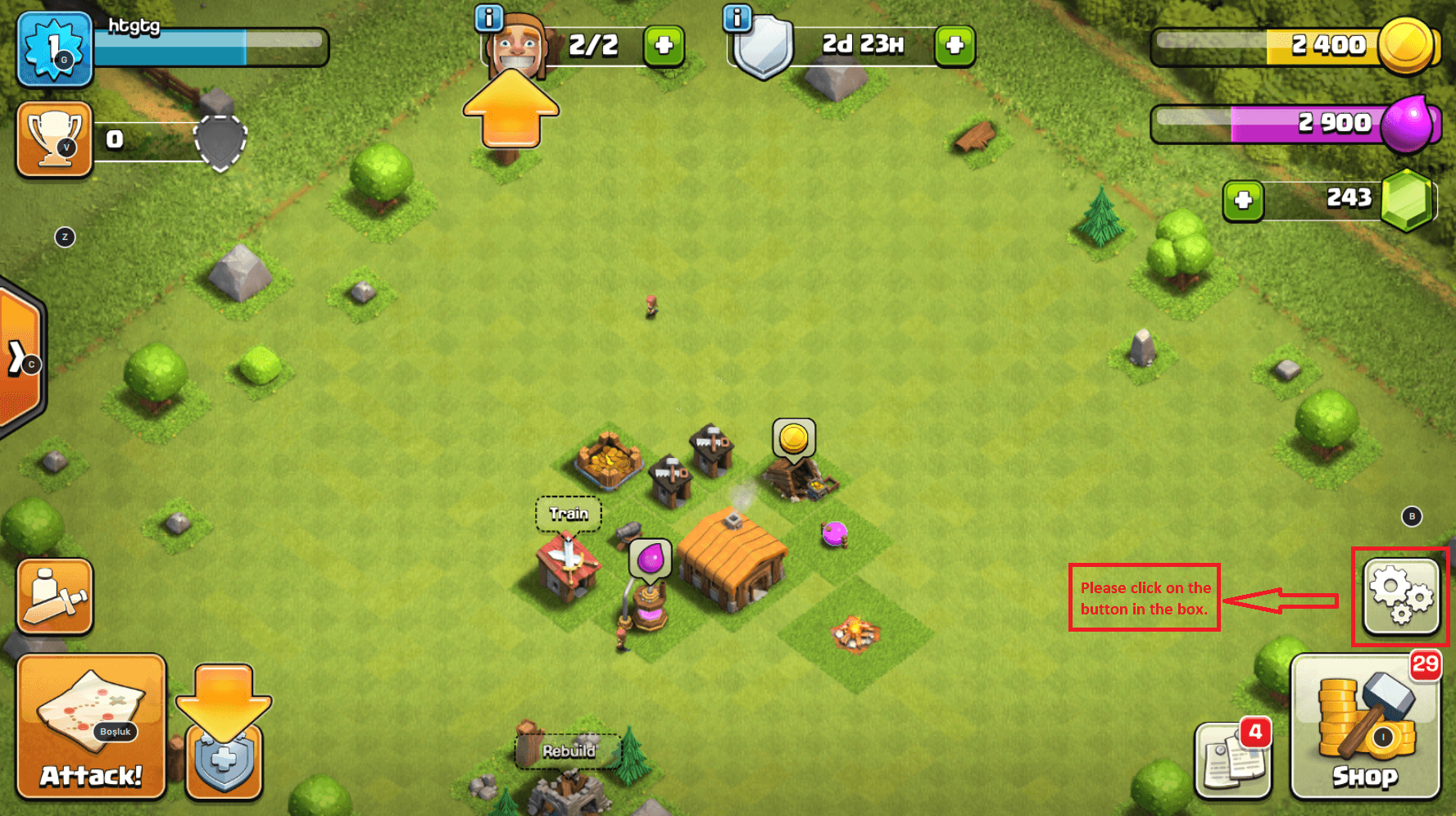
You can find out if your Clash of Clans account has a Supercell ID connection by following the steps below.
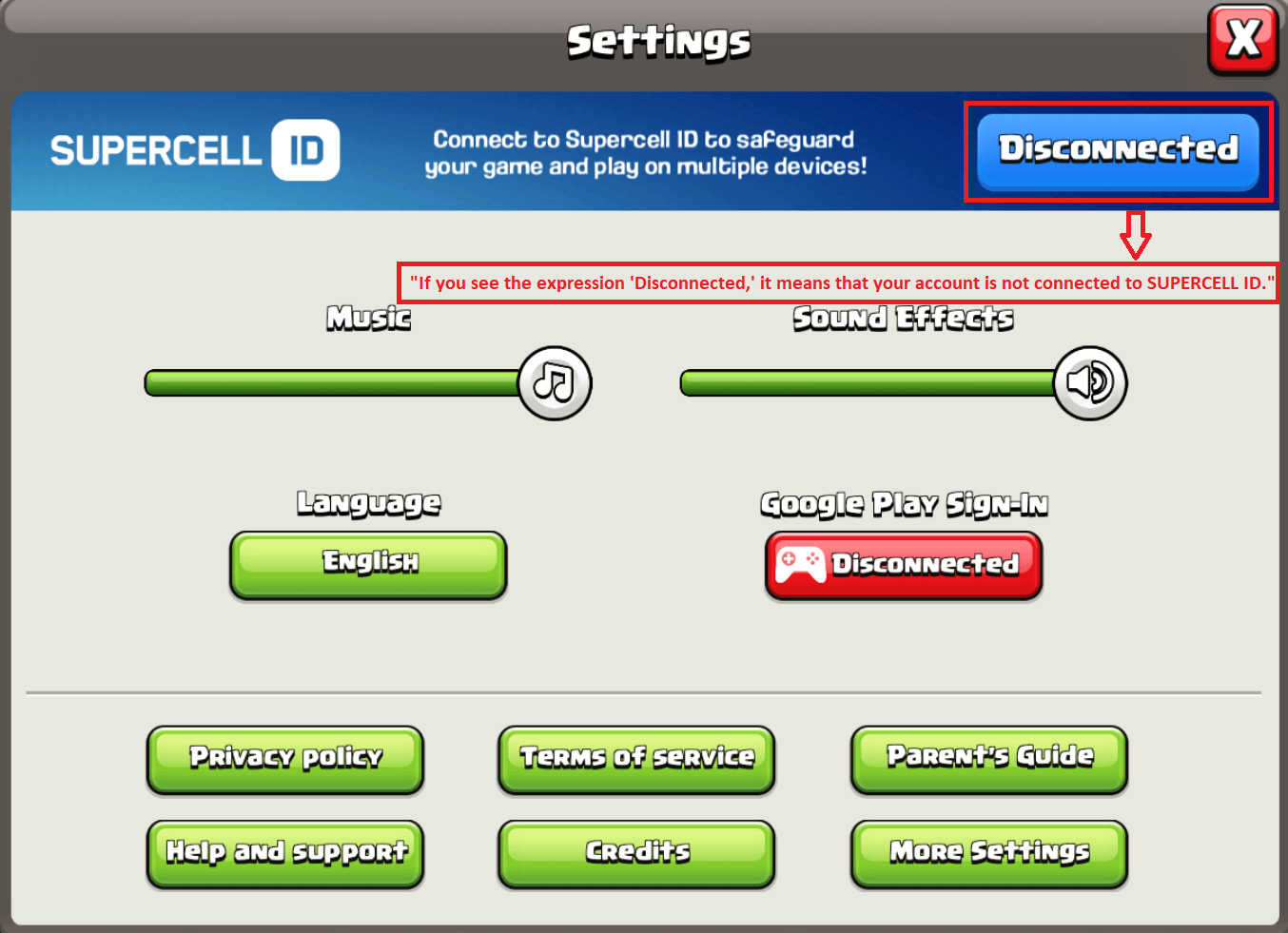
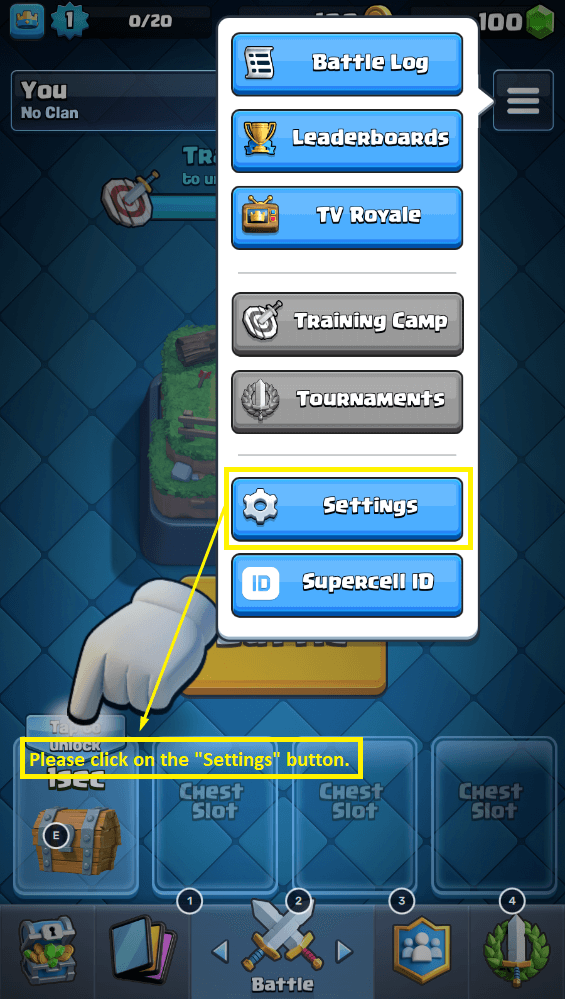
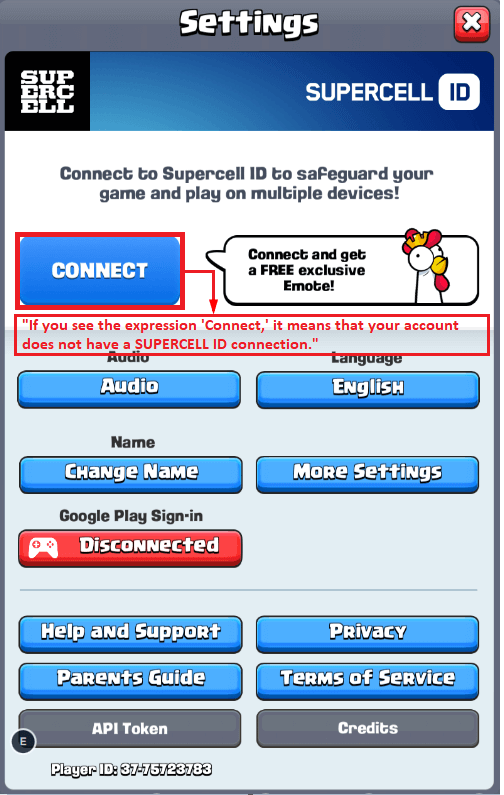
You can find out if your Clash Royale account has a Supercell ID connection by following the steps below.
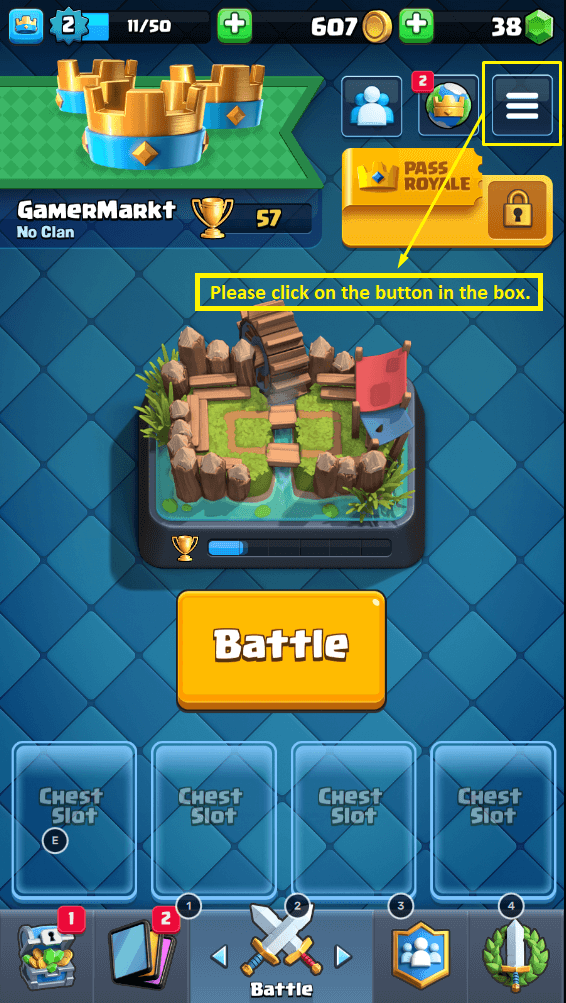
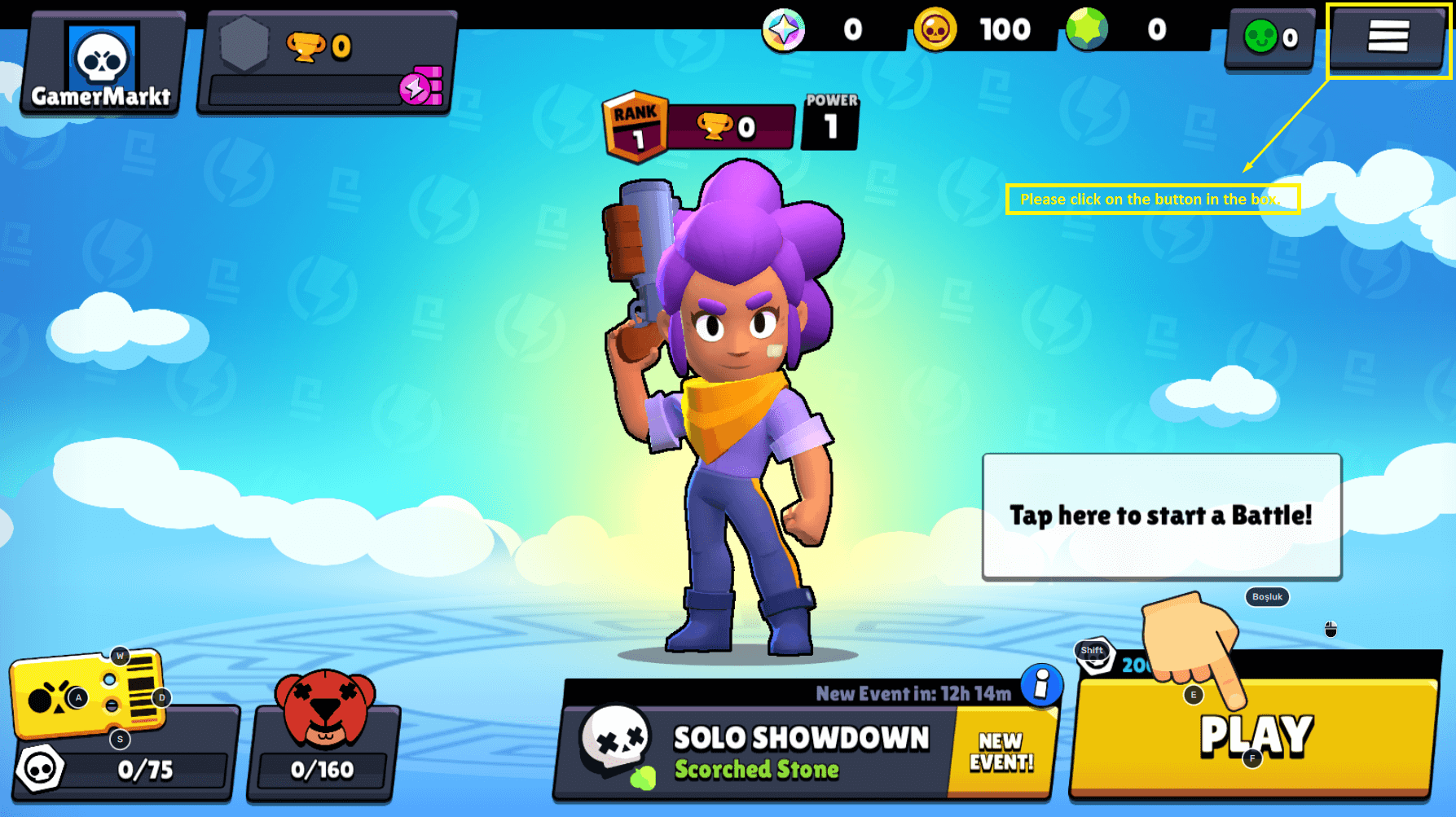
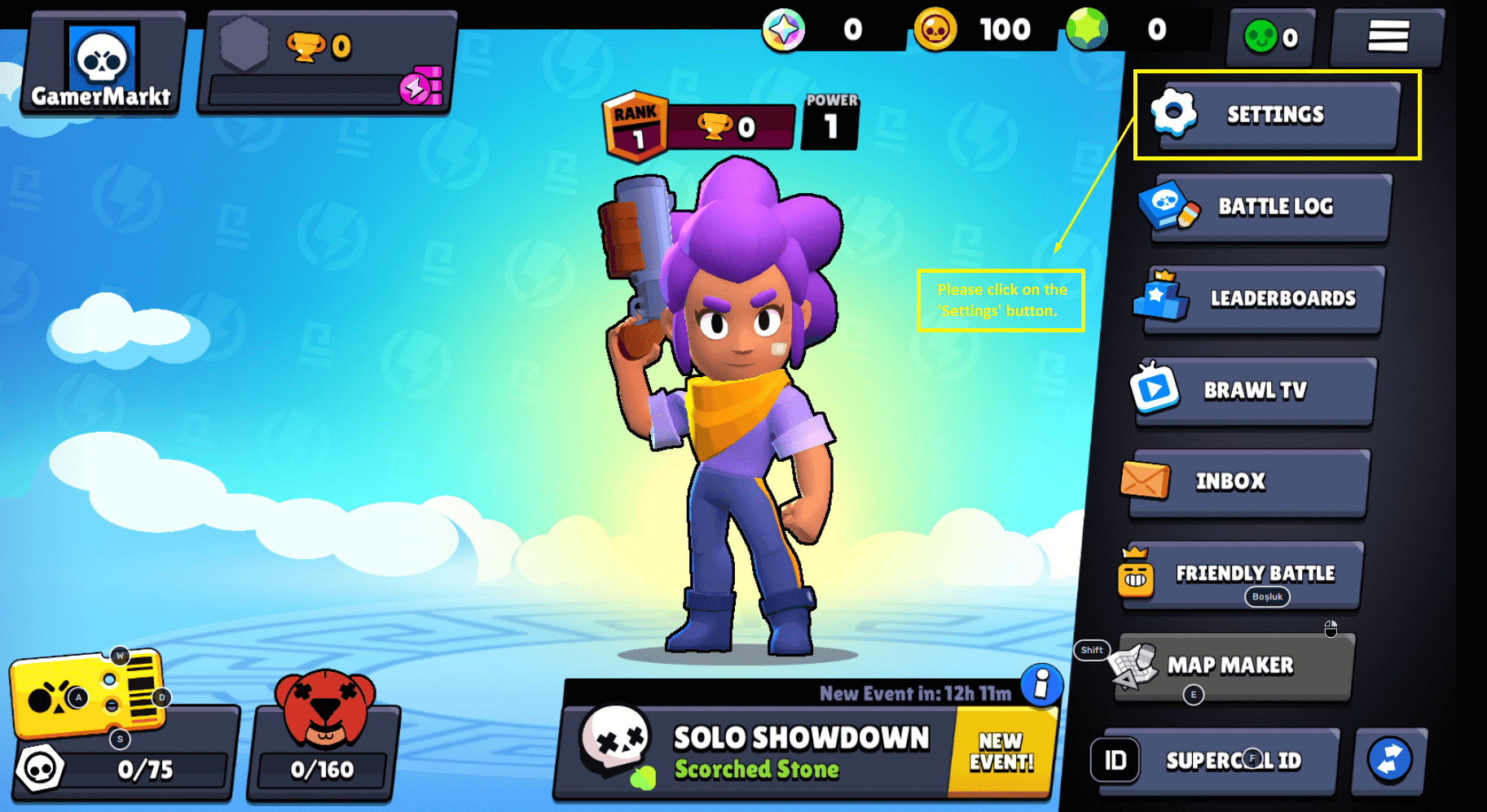
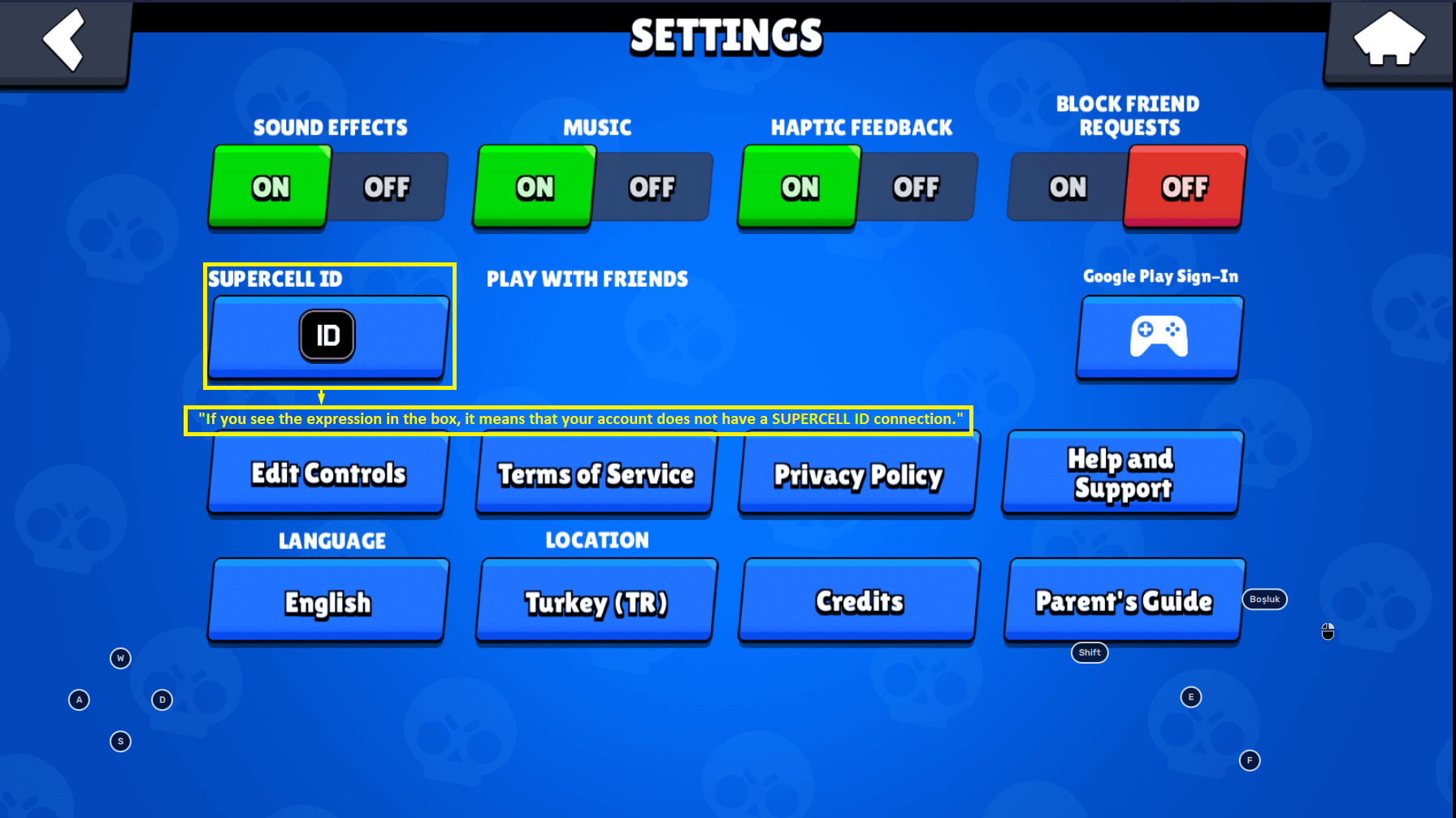
You can find out if your Brawl Stars account has a Supercell ID connection by following the steps below.
SELLER BADGES 6 Questions
Seller badges let you see at a glance how reliable a seller is before you buy. The badge appears next to the seller's name on listings, on the listing page and on the seller's profile.
Badges are recalculated every morning from the seller's sales in the last 3 months and the problems in those sales. So a badge isn't kept forever once earned: the seller keeps it as long as they go on selling regularly and without problems.
Sellers without a badge can sell too. Before buying, we recommend also looking at the sales count and history on the seller's profile.
You don't need to apply for a badge; sellers who meet the requirements get it automatically. Sellers who have just started show the New Seller badge until they complete their first few sales. After that, these requirements apply:
- At least 10 completed sales
- At least 3 sales in the last 3 months
- At most 5 issues per 100 sales
- At least 95% positive ratings (for a seller with ratings)
- No sales restriction in place
- At least 25 sales in the last 3 months
- At most 3 issues per 100 sales
- At least 98% positive ratings (for a seller with ratings)
- Selling for at least 6 months
- No sales restriction in place
The issue requirement looks at how many of your orders in the last 3 months had a problem. For example, 1 problem in 50 orders over the last 3 months equals 2 issues per 100 sales.
Your badge is updated automatically the morning after you meet the requirements, and you get a notification.
Achievements are medals sellers collect over time. The number on a medal shows the level reached; hover over it to see what it means. Most achievements stay once earned; only Fast Reply looks at the last 3 months.
- Sales medals go up from bronze to diamond as total sales grow.
- Tenure shows how many years have passed since the first sale.
- Game mastery comes from sales in the same game. Listing cards only show the mastery for that listing's game.
- Clean Streak counts sales completed in a row without any problem. A problem starts the streak over, but the best streak stays on the profile.
- High-Value Sales are earned by selling listings priced at € 100 or more.
- Loyal Customers counts buyers who bought from the seller more than once.
- Fast Reply shows for sellers who answered almost all buyer messages within 24 hours in the last 3 months.
- Seller of the Month and Seller of the Year go to the 10 sellers with the most sales that month or year, as long as they had very few problems in that period.
Only problems that the GamerMarkt team reviews and finds to be caused by the seller count towards the badge:
- A paid order cancelled because the seller gave up, didn't deliver within 24 hours, couldn't supply the product or couldn't be reached,
- The account not matching the listing, or having a ban or restriction,
- A problem with the order during the warranty period,
- A sold account being taken back, locked or banned,
- Insulting or inappropriate behaviour towards the buyer.
Cancellations asked for by the buyer, agreed by both sides or made after a security check don't count. An order counts once, however many problems it had. Issues drop out of the badge calculation after 3 months.
GamerMarkt restricts the right to sell of sellers whose issues are too many for their successful sales. When a restriction starts, the seller's active listings are removed and no new sales can be made until it ends. Each restriction lasts longer than the one before:
- First restriction: 7 days
- Second restriction: 14 days
- Third restriction: 1 month
- Fourth restriction: Permanent
Once the restriction ends, the seller can sell again and improve their profile with successful sales. No new restriction follows unless new issues come up.
A restriction is only changed in the case of a system error or a wrongly applied penalty. Otherwise it can't be lifted or shortened.
On the My Seller Profile page, under "My Account" -> "My Seller Profile" at the top right, you can see your badge, what's left for the next one, the achievements you've earned and your issues in the last 3 months.
Badges are updated every morning. If you get a penalty for an issue, your badge may drop right away without waiting for the morning.